Greetings
Upload and assign the audio callers hear before leaving a voicemail.
A greeting is the short audio clip a patient hears when they reach a voicemail. "You've reached Cardiology — please leave a message after the beep."
There are two kinds of greeting: a normal greeting and an on-call greeting. The on-call greeting plays whenever a team is on-call by its schedule; the rest of the time the normal greeting plays. A schedule can also carry its own greeting that overrides the on-call one while that schedule is active.
What patients hear
When a call goes unanswered, Novapulse picks up. The flow is:
- The greeting plays — the on-call greeting if a team is currently on-call, otherwise the normal greeting.
- A short beep.
- The patient speaks.
- They hang up, or stay quiet, and Novapulse stops recording.
The whole thing usually takes 30–90 seconds. You want the greeting to be short — most patients tune out anything over 15 seconds.
What makes a good greeting
Three things:
- Identify the practice. "You've reached Cardiology at Riverside Medical."
- Set the expectation. "Please leave your name, phone number, and the reason for your call."
- Offer urgent fallback. "If this is an emergency, please hang up and call 911."
You can also mention typical response time — "We'll call you back within one business day" — but only commit to something you can keep.
Where greetings live
Greetings work in two places:
- The greetings library — a shared, organization-wide list of every uploaded greeting. It lives at Desk → Greetings, and is available to organization admins and staff (it does not appear per-practice). This is where you upload, rename, preview, and delete greetings.
- Practice and workgroup settings — where you actually assign a greeting so callers hear it. You pick from the library, or upload a new one on the spot.
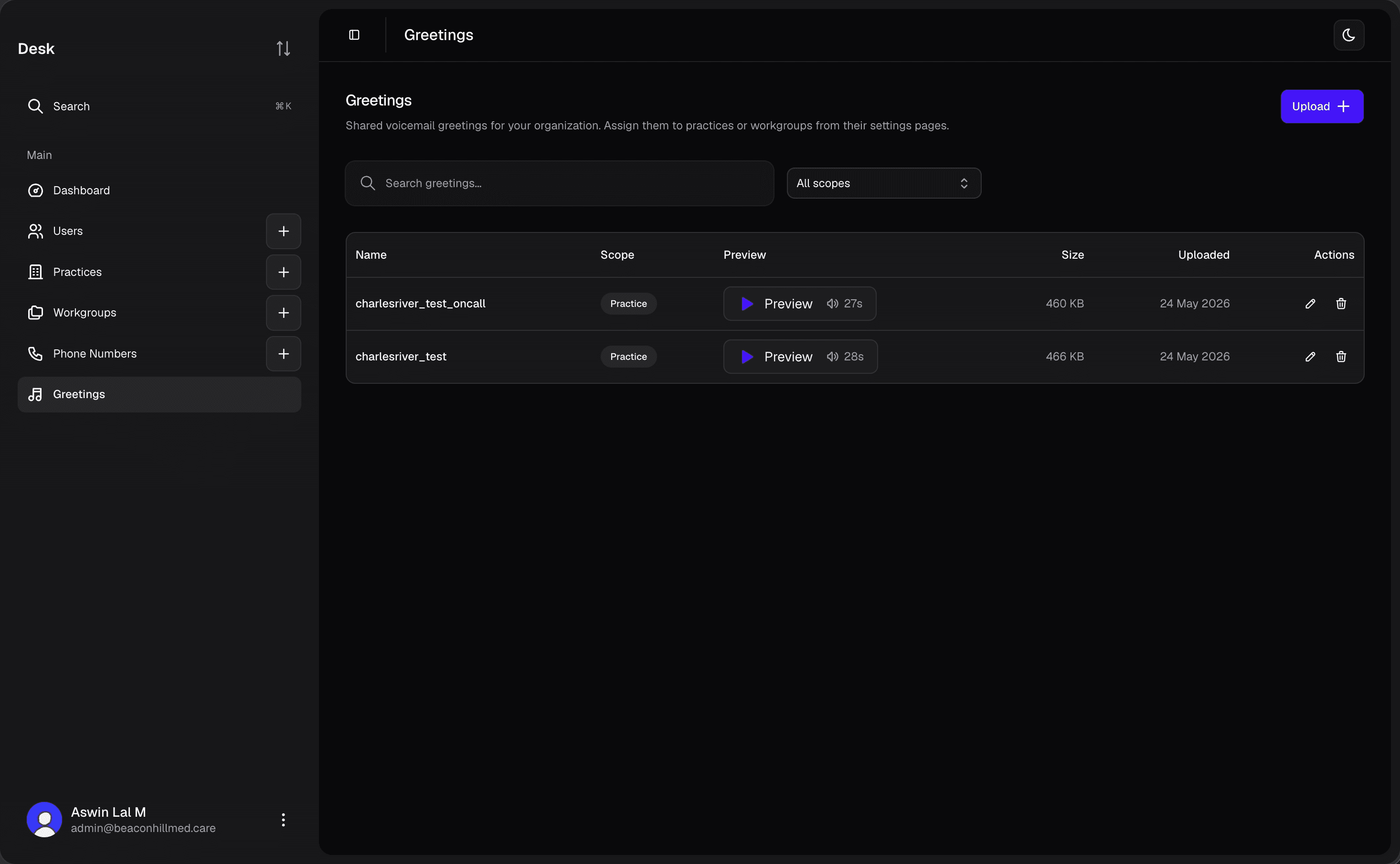 Screenshot: the greetings library at Desk → Greetings, showing each greeting with its scope and playback controls.
Uploading a greeting to the library does not put it live on its own — nothing changes for callers until a practice or workgroup is set to use it (see below).
Uploading a greeting
You can upload from either place:
- From the library: Desk → Greetings → Upload. The greeting is added to the shared library and can then be assigned anywhere.
- From a settings page: when assigning a greeting (see the next section), the picker has an upload option — you can add a new file inline without visiting the library first.
Either way you provide:
- Name — what this greeting is for (e.g. Cardiology Open Hours).
- Audio file — MP3 only, up to 5 MB. Keep it under 30 seconds for the best patient experience.
Assigning a greeting
Assigning is done from settings pages, not the library, and not on the phone number.
Practice settings
Open the practice → Settings → Voicemail greetings. Set the practice's normal greeting and its on-call greeting. The on-call greeting is used whenever any workgroup in the practice is on-call by its schedule; otherwise the normal greeting plays.
Practice Admins can change or upload greetings here (it needs practice-settings update permission), as can organization admins and staff.
Workgroup settings
Open the workgroup → Settings → Voicemail greetings. Set the workgroup's own normal and on-call greetings. This section only appears when the workgroup has its own phone number — otherwise the workgroup falls back to the practice's greetings.
Each on-call schedule within a workgroup can also have its own greeting, set on that schedule. A schedule's greeting overrides the workgroup on-call greeting while the schedule is active.
In both places the picker lets you choose an existing library greeting or upload a new one, preview it, swap it, or clear it.
How the greeting is chosen
For any given call, Novapulse resolves the greeting from the most specific level down:
- The active on-call schedule's greeting, if set.
- The workgroup's on-call / normal greeting (when the workgroup has its own number).
- The practice's on-call / normal greeting.
- The system default greeting.
On-call greetings
Every practice and workgroup has two greetings: a normal one and an on-call one. Most of the time the normal greeting plays. The on-call greeting only plays while a workgroup is on-call — that is, while its on-call toggle is on and one of its on-call schedules currently matches. Outside those windows, callers are back to the normal greeting.
The separate greeting exists because on-call changes where the call goes: while a workgroup is on-call, every voicemail is directed to that off-hours team regardless of subject (see Workgroups → On-call). Since callers are now reaching the on-call team rather than the usual desk, they should hear something that fits — who's covering and what to expect after hours. It also lets a practice sound different after hours without anyone flipping greetings manually each evening: during the on-call window callers hear the on-call greeting; when the window closes, the normal greeting comes back on its own.
You can set the on-call greeting at three levels, and the most specific one wins for any given call:
- On the schedule — set a greeting on a specific on-call schedule when that one window needs its own wording (e.g. a holiday closure).
- On the workgroup — the workgroup's on-call greeting, used whenever that workgroup is on-call and the active schedule doesn't set its own.
- On the practice — the practice's on-call greeting, the fallback for the whole practice.
If none is set, callers hear the system default.
A good on-call greeting sets after-hours expectations: identify the line, say who's covering, and give the urgent fallback — "You've reached the after-hours nurse line. Please leave your name, number, and reason for calling; the on-call nurse will call you back. If this is an emergency, hang up and call 911."
See Workgroups → On-call for how the on-call toggle, schedules, and banner fit together.
Default greeting
Every practice starts with a default greeting that Novapulse provides: a neutral, professional voicemail prompt. It works fine as a stopgap while you record your own, but custom greetings are almost always worth the few minutes it takes to record one.
Here's what the default greeting sounds like:
Holiday greetings
If you want callers to hear something specific during a closure — "Our office is closed for the holidays. We'll be back January 2nd." — upload a holiday greeting to the library, then assign it in the relevant practice or workgroup settings (or on the schedule that covers the closure) before the closure, and switch back afterward.
There isn't a built-in "auto-swap greeting on holiday" feature yet; do the swap manually on the settings page when the closure starts and ends.
Editing or replacing
You can't edit the audio of an existing greeting — to change the wording, upload a new one and switch the practice, workgroup, or schedule to point at it. You can rename a greeting from the library at any time. The old greeting stays in the library in case you want it back; a greeting that's still assigned somewhere can't be deleted until you unassign it.