Pseudo users
Teach Novapulse about staff names patients say on voicemails — even when those staff don't have a user account.
A pseudo user is a name a patient might say on a voicemail that doesn't correspond to a real Novapulse account. Pseudo users let the AI hear those names correctly and route the voicemail to the right teammate, even when the person being asked for never logs in.
Why they exist
Hospitals have lots of people patients name out loud:
- A specialist doctor who sees patients but doesn't use Novapulse herself — her receptionist handles all her messages.
- A lab technician, physiotherapist, or office manager who is referenced by first name but doesn't need an inbox.
- A front-desk lead whose name is on every greeting but who never opens the app.
Without pseudo users, the AI either mishears the name or has no idea who to assign the voicemail to. With pseudo users in place, the voicemail still gets tagged to a real person — the one you've nominated to handle that pseudo's messages.
How they fit into the pipeline
Pseudo users do two things every time a voicemail is processed:
- Help transcription get the name right. The pseudo user's name and any spelling variants you list are passed to the transcription model as a vocabulary hint, alongside your real users' names. This dramatically improves accuracy for unusual or non-English names.
- Resolve to a real assignee. When the AI reads the transcript and decides who the voicemail is for, it treats a pseudo user's name as a stand-in for the real user you mapped them to (the tagged user). The voicemail lands in that real user's mentions and assignments.
For this to work, Auto-tag user must be on in the practice's Auto-tagging settings — pseudo users are a refinement of auto-tagging, not a replacement for it.
Anatomy of a pseudo user
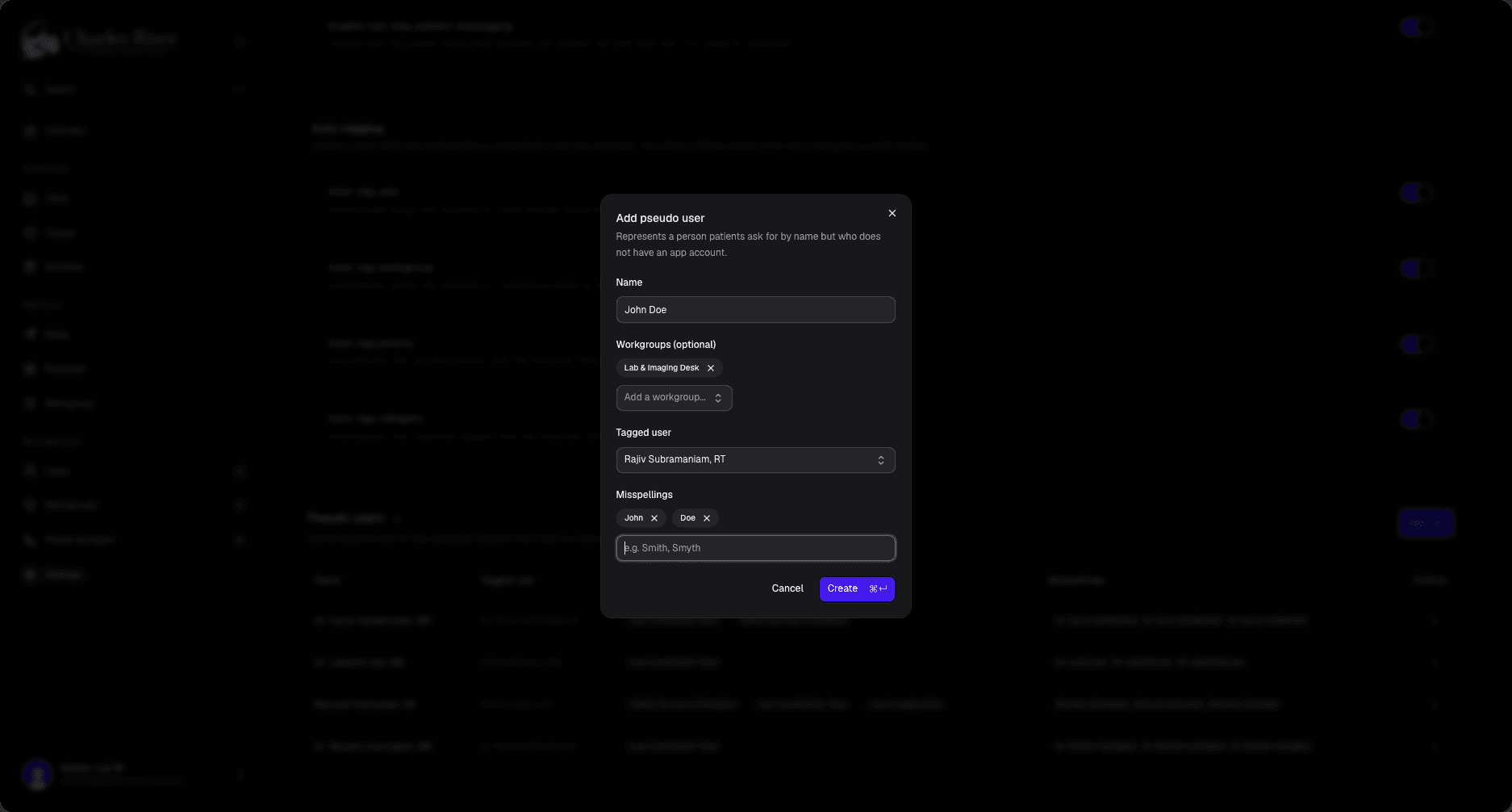
Each pseudo user has four fields:
- Name — what callers say. This is the primary spelling the transcription model is primed on. Example:
Dr. SmithorPriya. - Misspellings — other ways the name might be transcribed. Add Whisper-friendly variants the model gets wrong (e.g.
Dr Smyth,Smiff,Priyaa). Each one becomes another vocabulary hint. - Tagged user — the real Novapulse user the pseudo resolves to. When the AI hears the pseudo name, this is the user the voicemail gets assigned to. Required.
- Workgroups — optional list of workgroups the pseudo user "belongs to." The AI uses this as a routing hint when picking which workgroup tag to apply (in addition to the tagged user's own workgroups).
Creating a pseudo user
- Open the practice → Settings.
- Scroll to the Pseudo users card and click Add.
- Fill in the name, optional misspellings (one per row), pick a Tagged user from the practice's real users, and tick any workgroups they should hint at.
- Save.
The change takes effect on the next voicemail processed for that practice — existing voicemails are not re-tagged.
Editing and deleting
From the Pseudo users card on the practice settings page:
- Edit — change the name, misspellings, tagged user, or workgroup hints. Same caveat: only affects voicemails processed after the change.
- Delete — removes the pseudo user. The pseudo's name won't be primed on transcription anymore, and the AI will no longer auto-resolve it to the tagged user.
Both actions require the same permissions as other practice settings edits (org:settings:update, practice:settings:update, or system:settings:update).
Examples
A specialist who doesn't log in
Dr. Anita Rao is a cardiologist who sees patients three days a week. She never logs into Novapulse — her receptionist Maya does, and Maya wants every voicemail that mentions "Dr. Rao" to land in her own inbox.
Create a pseudo user: name
Dr. Rao, misspellingsDr Rao,Doctor Rao,Anita Rao. Tagged user: Maya. Workgroups: Reception.A voicemail that says "I'd like to confirm my Friday appointment with Dr. Rao" now gets auto-assigned to Maya and tagged with the Reception workgroup.
A name that's hard to transcribe
Your physiotherapist Aishwaryaa keeps getting transcribed as "Eish Verya" or "Ash Worya."
Even if Aishwaryaa is a real user with an account, you can also add a pseudo user — or, better, just add
Eish VeryaandAsh Woryato her own user record's misspellings field. Use a pseudo user when the spoken name resolves to a different person than the one being said; use misspellings when it's the same person.
A team alias
Patients often say "the billing lady" instead of a person's name.
Create a pseudo user named
billing ladywith the billing team lead as the tagged user. The AI will assign matching voicemails to her so she can triage from there.
Tips
- Be specific with the spoken name. "Dr. Rao" is better than "Anita" — common first names will collide with real users and cause weird routing.
- Add misspellings aggressively. It costs nothing and substantially improves transcription quality on the names that matter to you.
- Pseudo users are per-practice. A pseudo user created in the Cardiology practice doesn't exist in Reception. If the same name needs handling in two practices, create it in both — likely with different tagged users.
- Pseudo users with a deleted or hidden tagged user are skipped. If you delete the user a pseudo points to, fix the mapping or delete the pseudo — leaving it stale just means the AI ignores it.
Related
- Practices → Settings — where the Pseudo users card lives.
- Users → Misspellings — for name-variant handling on a real user account.
- Voicemail Inbox — how the AI's tags surface to staff.